Adobe Photoshop is expanding its artificial intelligence toolkit with a new feature called AI Assisted Editor, allowing users to work on their images using natural language prompts. The addition does not replace the traditional Pro Editor; instead, it sits alongside it as an alternative way of working.
The company has steadily increased Photoshop’s AI capabilities over the past year. AI Assistant arrived in March to enable editing through conversational commands, and in June, Adobe added AI assistants to Photoshop, Premiere Pro, InDesign, Illustrator and Frame.io. Earlier this month, OpenAI and Adobe teamed up to integrate dozens of photo- and video-editing capabilities into ChatGPT.
Alongside AI Assisted Editor, Adobe announced several further tools, including a light adjustment layer for more detailed lighting controls, Instruct Edit with Masks for prompt-based editing, and Markup, which lets users visually communicate edits by drawing on an image. AI Assisted Editor is currently being tested in the beta version of Photoshop, which costs around £18 per month.
How AI Assisted Editor Works
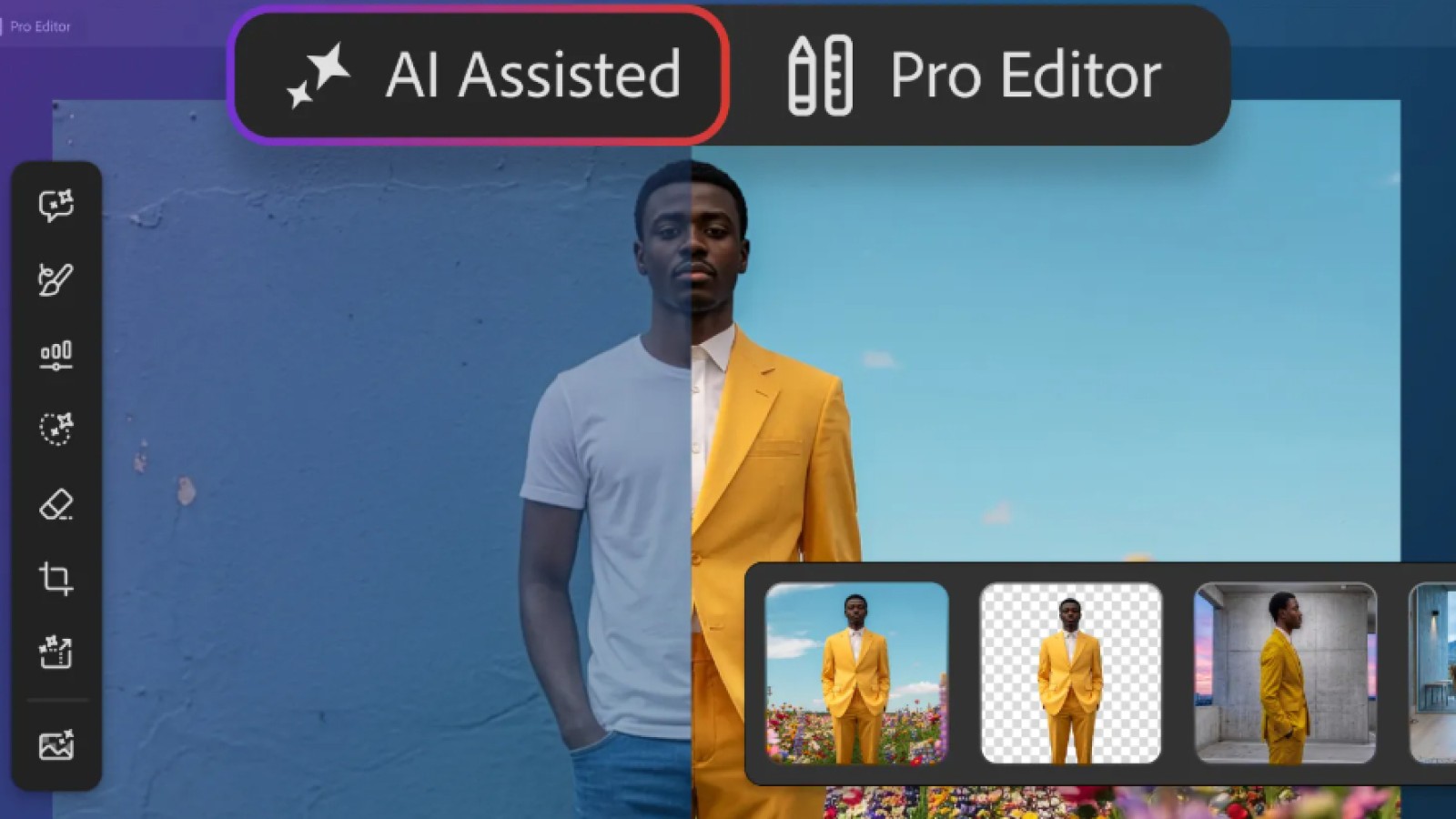
When opening Photoshop, users are presented with two editing interfaces: AI Assisted and Pro Editor. The Pro Editor remains Photoshop’s classic workspace, offering manual control over layers, adjustments and editing tools. The AI Assisted option is aimed at simpler editing and may appeal to less-experienced users, while seasoned Photoshop users are likely to remain comfortable with the Pro Editor.
Choosing AI Assisted gives access to a natural language prompt bar for requesting edits and changes. A vertical tool bar offers seven functions: prompt to edit, remove background, generative expand (to extend image dimensions), generative remove (to eliminate unwanted objects), generative fill (to add, replace or remove content), generative upscale (to increase image resolution) and AI markup (to annotate images).
The Prompt to Edit function may prove the most significant. It allows the image to be changed entirely with a natural language instruction. For example, an image of someone sitting on a beach could be altered with a prompt such as “Put this person on a hiking trail in the mountains”.
Additional New Photoshop Features
Adobe also announced three further options described as offering more precise, sharper editing. The light adjustment layer lets users toggle through several lighting controls, including exposure, contrast, highlights, shadows, whites and blacks.
The Instruct Edit with Masks function allows users to describe the edits they want in masked areas, such as having a person smile, putting a bird in flight or opening a blue door, rather than marking every area of the image to be edited.
The Markup tool lets users draw directly on an image to communicate changes to the AI. This might involve circling a building and instructing the AI to make it brown, or drawing an arrow to indicate where a certain object should go. According to Adobe, Markup offers a way of being more precise with the AI, avoiding the ambiguity that can occur with text prompts alone. AI Assisted Editor is available in the beta version of Photoshop.